
Project management is another one of those things you don’t learn in library school. Yet it’s extremely important for both team and individual projects; as Heather A. Johnson says, “As libraries continue to evolve in the services they provide, librarians may be increasingly responsible for managing large projects, planning programs and outreach, and coordinating teams” (2017). I typically have four or five projects to manage at any given time, usually on my own or in collaboration with one of my colleagues. And all too often, I end up looking at a mish-mash of tasks, reminders, and ideas that feels so overwhelming that I just want to scrap everything and start over.
This is why organized project management is a hot topic for me; without it, I would never be able to complete any meaningful projects. It’s important to me that my project management system is comprehensive, simple, and effective. I want to be able to see everything I’m working on at once, while at the same time having separate spaces for each project. I want it to be easy to capture information and make edits, and flexible formatting is a plus.
For a long time, I used OneNote to capture all my project to-do lists. I had one section for my daily to-do list and monthly overviews, and separate notebooks for each project. Each project notebook had it’s own collection of sections and pages. This system eventually grew to be too complicated. Important information was hidden within nested pages in a number of notebooks, and since it was out of sight, it was out of mind.
I recently switched to Trello, a web-based project management system. There’s a great review on Trello from JMLA from 2017. Here’s how Trello describes itself:
Imagine a white board, filled with lists of sticky notes, with each note as a task for you and your team. Now imagine that each of those sticky notes has photos, attachments from other data sources like BitBucket or Salesforce, documents, and a place to comment and collaborate with your teammates. Now imagine that you can take that whiteboard anywhere you go on your smartphone, and can access it from any computer through the web. That’s Trello!
There are a ton of interesting articles out there about using Trello to manage projects and daily tasks:
- Using Trello for Project Management: An Easy Step-by-Step Guide – Hubstaff
- How to Organize Your Entire Life with Trello – Lifehacker
- 10 Ways to Use Trello for Project Management – Medium
Trello also provides an Inspiration section, with board templates you can adapt to your own purposes. Here are my favorites:
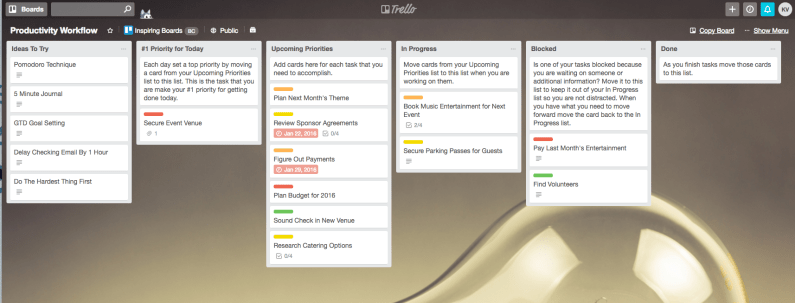
- Productivity Workflow (my current daily workflow board is modeled after this template)
- Editorial Calendar (I’m using this board to finally start keeping track of regular blog posts)
- Conference Planning (I’m planning our regional conference at the moment, so this was a great find, but this could work for any type of event planning
And, as it turns out, I’m not the only librarian taking advantage of Trello’s project management capabilities. I discovered a number of articles and blogs describing how different kinds of libraries and librarians are using the platform:
- Twenty Five Ways to Use Trello in Libraries – Roughly Right
-
Keeping It All Together with Trello: A Project Management Tool for Library Programming – Programming Librarian
- Ultimate Idea Board: Ways to Use Trello in Libraries – Trello Board
I ended up spending a Sunday completely redesigning my project management system, and it has been so much easier to keep track of what I need to be working on. I’m playing around with different Power-Ups and doing my best to take full advantage of the color-code card labels. It’s only been about three weeks, but I’m hoping this can be a permanent solution to monitoring my projects and motivating myself to finish them.
 Kathryn Vela