
Earlier this week, I found myself in a bit of a sticky situation. I had run a search in Ovid MEDLINE and needed to export the results to EndNote, but I wasn’t able to do it right away. So I used the “Email” function in Ovid to send the results to myself so I could download and import them to EndNote when I finally had time. When that time came, I realized that the results had been sent to me in a text file, which EndNote does not handle very well (or at all).
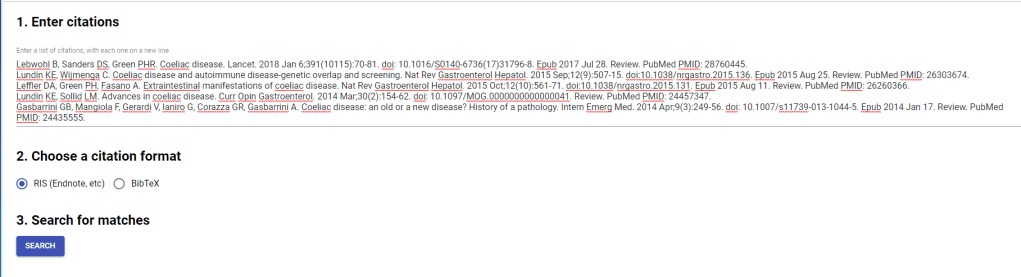
I was loathe to enter each citation into EndNote manually, so I did some searching to see if there was anything else I could possibly do to get these results into EndNote. And I stumbled upon HubMed Citation Finder. It allows you to enter citations as lines of text, which it then matches to citations in PubMed and creates a download file for you in RIS or BibTex format. Just what I needed!
I had never heard of HubMed Citation Finder before this crisis, but it seems like it’s been around for a while. The first mention of it that I discovered was on a 2012 blog post from the UCSF Library, and the second mention was in another blog from 2006. Other than that, it’s kind of hard to find any clear information about how it was developed or who is in charge of it.
That didn’t stop me from trying it out, though. Here’s what I learned about how it works:
- Type or copy/paste your citations into the first box on the page. There’ s no auto-formatting, so if you have extra stuff like numbering or links, you should delete those before moving on to the next steps. The tool will still work if you decide to skip that step, but it’s definitely not as accurate as it could be.
- Select the file format you want, out of RIS or BibTex.
- Search!
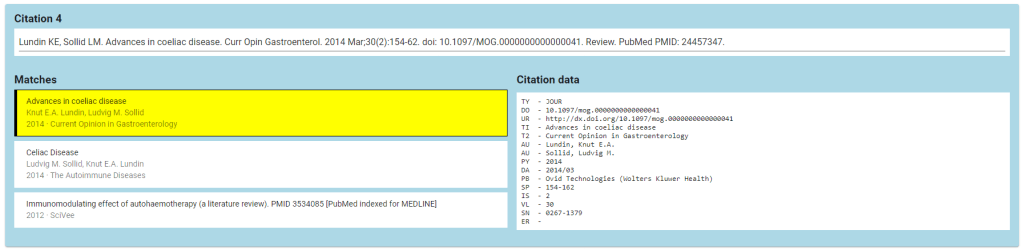
- Once you have your results, you need to double-check that the tool made the correct match. A few things to keep in mind:
- The citation information provided in the matches is sometimes a little confusing, so I reference the citation data provided on the right.
- It seems to get confused by updates to Cochrane Reviews, so pay extra attention to the dates on those citations.
- If there’s no correct match, you can just de-select the proposed match and skip that citation. Be sure to make a note for yourself!
- After you’ve verified the accuracy of the matches, you can download the citation file and get on with your life!
This isn’t a tool with super broad implications; it’s pretty much only good for one specific problem. But when you have that problem, it’s nice to have a relatively quick way to solve it (quicker than manual entry!). HubMed Citation Finder has definitely earned a spot in my bookmarks.
 Kathryn Vela